


Timemark: Photo Proof for Work
4.8392.00 Reviews
App Specs
- Version
- v10.0.210
- Updated On
- License
- Free
- Downloads
- 10,000,000+
- Developer
- OG Co.
- Categories
- Photography
- Platform
- Android, iOS
Screenshots
 Analysis by AppCompare
I think of a timestamped photo as a small piece of documentation, not just a picture with a label. That distinction matters when I need to remember when a job was done, show the state of a room before work began, or sort pictures from several stops in a busy day. Timemark: Photo Proof is aimed at that practical side of photography: it helps make images easier to place in time and context, rather than focusing on artistic editing.
When a quick capture matters
Speed is most useful when the camera is part of a task, not a separate creative session. If I’m recording a delivery, checking a repair, or documenting a property visit, I want to take the picture and move on without opening a general photo editor and adding context later. Timemark’s focus on job photos makes that workflow its clearest reason to exist.
That convenience depends on keeping the setup simple. Before heading out, I’d choose a timestamp style and position that remain legible across the kinds of scenes I expect to photograph. A large stamp may be easy to read on a plain wall but distract from a detailed image; a subtle one can disappear against a busy background. Testing the look on a few sample photos is a better use of a minute than discovering later that the chosen placement obscures the detail the picture was meant to prove.
Useful under a full day’s workload
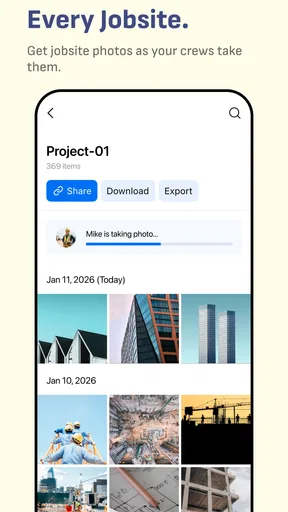
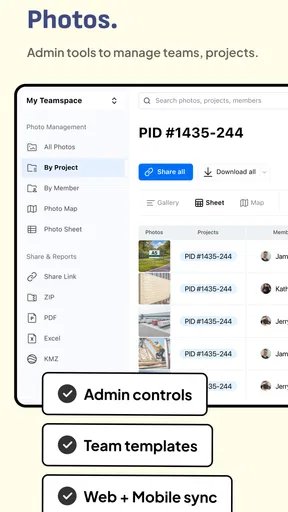
The app becomes more valuable when photos arrive in groups rather than one at a time. A contractor finishing several rooms, a letting agent visiting multiple properties, or a field worker checking equipment can benefit from keeping visual records organized around the work. Batch processing, as described in the app’s feature set, can reduce repetitive handling when a set of existing pictures needs the same treatment. I would still review a small sample first: applying one style to everything is quick, but a batch can also spread a poor placement or an unsuitable format across the whole set.
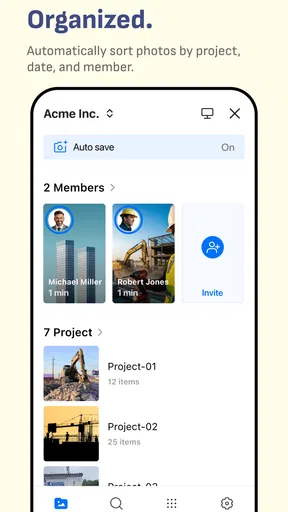
A practical routine is to separate photos by visit or task before processing them, then apply a consistent stamp to each group. That makes later browsing easier and helps avoid mixing pictures from different jobs into one confusing run. The app is not a substitute for a clear filing habit, but it can make the images themselves more informative when they are viewed outside the camera roll.
Where it sits beside ordinary camera apps
A standard camera app is still the better choice when I want the cleanest original image, flexible photography controls, or no visible text on the picture. A general photo editor is more suitable when the priority is retouching, cropping, or creating a polished social post. Timemark is more focused: it makes sense when a visible time or location marker is part of the record, and less so when the image is meant to stand on its own.
That visible marking is also a trade-off. Once a timestamp is part of the image, it can be harder to reuse the photo for a different purpose without returning to an unmarked original. I’d keep the source image when it matters, especially for work records that may need later editing or a clean copy. A timestamp can add useful context, but it should not be treated as proof that a photo is unaltered or as a replacement for careful record keeping.
Worth Reading Before You Choose

Flipboard Shows What News Apps Must Do Beyond the Feed

Switching to Android Auto Means Rethinking Your Driving Routine

Google Calendar Makes a Crowded Week Easier to Manage

Ludo King Makes the Most of the Minutes Between Plans

Baby Panda World Brings Quick Play to Modern Phones, but Its Game Library Feels Busy

ESPN’s Live Game View Makes Following Close Games Easier
Who will get the most from it
I’d consider it for people who repeatedly need dated visual records: tradespeople, property managers, inspectors, delivery teams, and anyone who tracks progress with before-and-after images. It can also suit personal projects such as documenting a renovation or keeping a chronological travel record. The key question is whether the stamp solves a recurring problem. If I only want to date a picture now and then, the extra step may not earn a permanent place on my phone.
It is less compelling for photographers who care about keeping images unmarked, people who already have a dependable documentation workflow, or users looking for a full editing suite. It also won’t make a vague photo informative by itself. A close-up without enough surrounding detail can still be hard to interpret, even when its timestamp is clear. I’d frame each shot to show what is being recorded, then use the mark as supporting context rather than relying on it to explain everything.
For a realistic workday, imagine arriving at a rental property to record a maintenance issue. I’d photograph the problem with enough of the room in view to identify its location, then take a closer image of the damage. A consistent timestamp helps distinguish that visit from later repair photos. If I’m documenting several properties, I’d also group the images by address or task outside the stamp itself; a date and location marker can help, but it cannot replace a useful naming or filing system.
What to check before relying on a record
Timestamp and geotagging are useful only when the underlying details suit the purpose. Before using the app for work, I’d check that the displayed date, time, and location are what I intend to share, and that the stamp does not cover important evidence. This is especially worth doing when a phone’s clock or location context may be wrong. A visible label can make a photo easier to understand, but it does not independently verify the circumstances of capture.
Privacy deserves the same attention. A location marker may reveal more than the subject of the photo, particularly if an image is later shared publicly or sent beyond the original work group. I’d use location details when they help identify a job site, and leave them out when they expose a private home or routine unnecessarily. That small decision can make the difference between useful documentation and oversharing.
First Impressions and Setup
Setting up Timemark: Photo Proof is as straightforward as it gets. Download, install, and you’re ready to go. The app greets you with a clean and user-friendly interface, which is always a good start. No one wants to wrestle with confusing menus, especially when all you want to do is snap a quick pic.
Once you’ve got it up and running, you’ll notice the minimalist design. It’s almost as if the app is saying, "Hey, I’m here to make your life easier, not harder." You can quickly access the camera or go through your gallery to timestamp existing photos. It’s intuitive, and you’ll find yourself navigating through it like a pro in no time.
Features That Stand Out
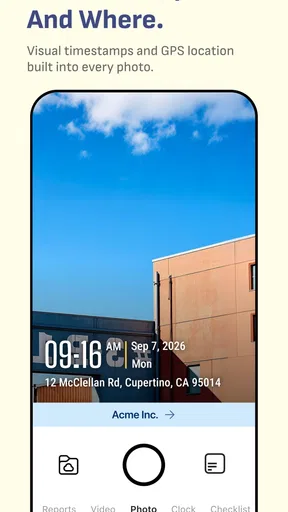
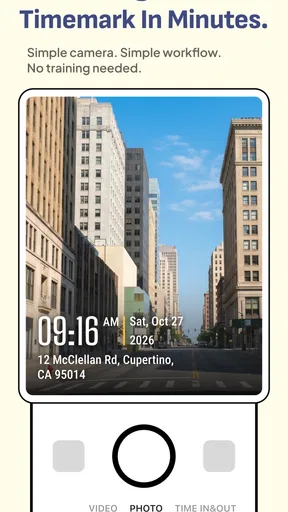
Now, onto the fun part – the features. This app does more than just slap a date and time on your photos. You can customize the format, style, and even the position of the timestamp. Want it bold and prominent or subtle and sleek? The choice is yours.
There’s a nifty little feature where you can add watermarks. For those concerned about privacy or authenticity, this is pure gold. You can personalize it, making sure your images aren’t just any images—they’re your images.
The app also allows batch processing, which is a huge time-saver. Imagine you’ve just come back from a vacation with a thousand photos. Instead of painstakingly adding timestamps one by one, you can do it in one go. It’s efficient and respects your time.
Performance and Usability
In terms of performance, Timemark: Photo Proof is a smooth operator. There’s hardly any lag when switching between functions, and the app doesn’t weigh down your phone’s performance. Even on older devices, it holds its ground, which is crucial for an app that’s meant to be quick and easy to use.
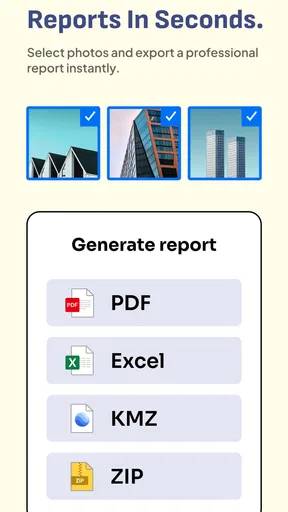
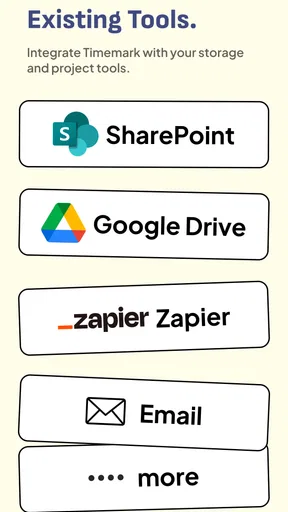
Another thing I love is how it integrates with cloud services. You can save your timestamped photos directly to your preferred cloud storage. This feature is a lifesaver for those who constantly juggle between devices and need their photos to be accessible anytime, anywhere.
Why You Might Love It
If you’re someone who loves documenting your life, whether it’s through travel photos, food snaps, or just daily moments, this app is a must-have. It adds a layer of credibility and context to your memories. Plus, it’s perfect for professionals who need to verify when and where a photo was taken – think journalists, real estate agents, or even social media influencers.
The customization options alone make it a tool worth exploring. You’re not just limited to date and time; you can also add location data, which is super handy for those travel photos you want to brag about.
A Few Considerations
No app is perfect, and Timemark: Photo Proof is no exception. Some users have reported occasional glitches when exporting photos, but these are rare and usually fixed with updates. It’s also worth noting that while the app is free, some features are locked behind a paywall. So, if you’re in it for all the bells and whistles, be prepared to shell out a few bucks.
Overall, it’s a small price to pay for the convenience and added features, especially if you’re serious about your photos.
Final Thoughts
In a world where photos are snapped and shared in seconds, Timemark: Photo Proof offers a way to make yours stand out, giving them a unique stamp of authenticity. It’s easy to use, packed with features, and designed to enhance, not complicate, your photo-taking experience. Whether you’re a casual snapper or a professional, it’s an app that deserves a spot on your phone.
So, next time you’re out capturing moments, why not give them a little more depth and meaning with a timestamp? After all, every photo has a story, and Timemark helps tell it.
Cost, compatibility, and everyday fit
Timemark is a free photography app from OG Co., with optional in-app purchases ranging from $1.49 to $59.99 per item. It is rated for Everyone, has an average rating of 4.8 from around 737,000 ratings, and has passed 10 million installs. Those figures suggest broad uptake, but I’d still judge it by whether its workflow fits my own photo habits rather than treating popularity as a guarantee that it will suit every device or job.
The app was released on May 5, 2023, and its current version is v10.0.136. It requires Android 8.0 or later. That minimum makes it a reasonable option for many Android phones, though age alone doesn’t tell me how quickly a particular device will handle larger image batches. If I’m working with an older or storage-constrained phone, I’d begin with a handful of pictures and check the resulting files before committing a whole job’s archive.
Stability, exports, and a sensible routine
For any app used to document work, reliability is less about a polished screen than about being able to find the right image afterward. I would not make a single copy the only record of an important inspection: keep the original where possible, check that processed images appear in the intended place, and make sure a small test export can be opened before relying on a larger batch. This is a straightforward safeguard, not a complicated backup system.
Export friction matters more when a team needs to send pictures immediately than when I’m organizing personal memories at home. If a file does not appear where I expect, I’d pause and verify the output before repeating the process; making several duplicate batches can create more confusion than the original delay. The useful habit is to process a small group, inspect it, and only then move on to the rest.
Timemark’s strongest case remains focused rather than universal: it gives people who need timestamped, location-aware photo records a dedicated route that ordinary camera rolls do not provide as directly. I’d try it if that need comes up every week, and I’d compare the free experience with the paid options before spending. If I rarely need visible marks, or if clean originals and advanced image editing matter more, my regular camera and editor remain the better everyday tools.
Pros
- Easy to use with intuitive interface.
- Supports high-resolution images.
- Quickly adds time and location stamps.
- Customizable stamp options.
- Seamless sharing to social networks.
Cons
- Limited free version features.
- Occasional app crashes reported.
- Requires location access always.
- Ads can be intrusive at times.
- No cloud storage integration.
FAQs for Timemark: Photo Proof for Work
What is the main purpose of Timemark: Photo Proof?
Timemark: Photo Proof is designed to help users capture and document events with timestamped photos, ensuring authenticity and accuracy. Ideal for professionals needing to log events or individuals who want to keep an accurate timeline of memories, the app adds a precise date and time to photos, making them verifiable.
How user-friendly is the app for beginners?
Timemark: Photo Proof is designed with a clean and intuitive interface, making it easy for beginners to navigate. The app provides straightforward instructions for taking photos and adding timestamps, ensuring that even first-time users can quickly understand its functionality without extensive tutorials or guides.
Are there customization options available for timestamps?
Yes, Timemark: Photo Proof offers several customization options for timestamps. Users can choose from different formats, styles, and positions on the image. This flexibility allows users to tailor the appearance of their timestamps to better suit personal preferences or professional requirements.
Is Timemark: Photo Proof available on both Android and iOS?
Timemark: Photo Proof is available for download on both Android and iOS platforms. This cross-platform availability ensures a wide range of users can access and utilize its features, regardless of their preferred mobile operating system, making it a versatile tool for all.
What are the privacy considerations when using the app?
Timemark: Photo Proof prioritizes user privacy by ensuring that photos and data are stored locally on the device. The app does not automatically upload or share images to the cloud unless explicitly directed by the user, providing peace of mind regarding personal data security and privacy.


